DuckDuckGo autocomplete now puts agent handoff beside agent handoff vscode, Copilot agent handoff, Microsoft agent framework handoff, OpenAI agent handoff, and LangGraph agent handoff. That is a useful search cluster because it is not asking what a handoff is. It is asking how the next coding agent gets enough state to keep working inside the editor.
My take: agent handoff in VS Code should not mean pasting a nicer summary into another chat panel. The handoff has to carry ownership. A receiving agent needs the room history, the exact unread boundary, the next action, the addressee, and the code artifact when code changed. Without those pieces, VS Code is just the place where the copy-paste happened.
Agent handoff in VS Code needs a runtime boundary, not another prompt
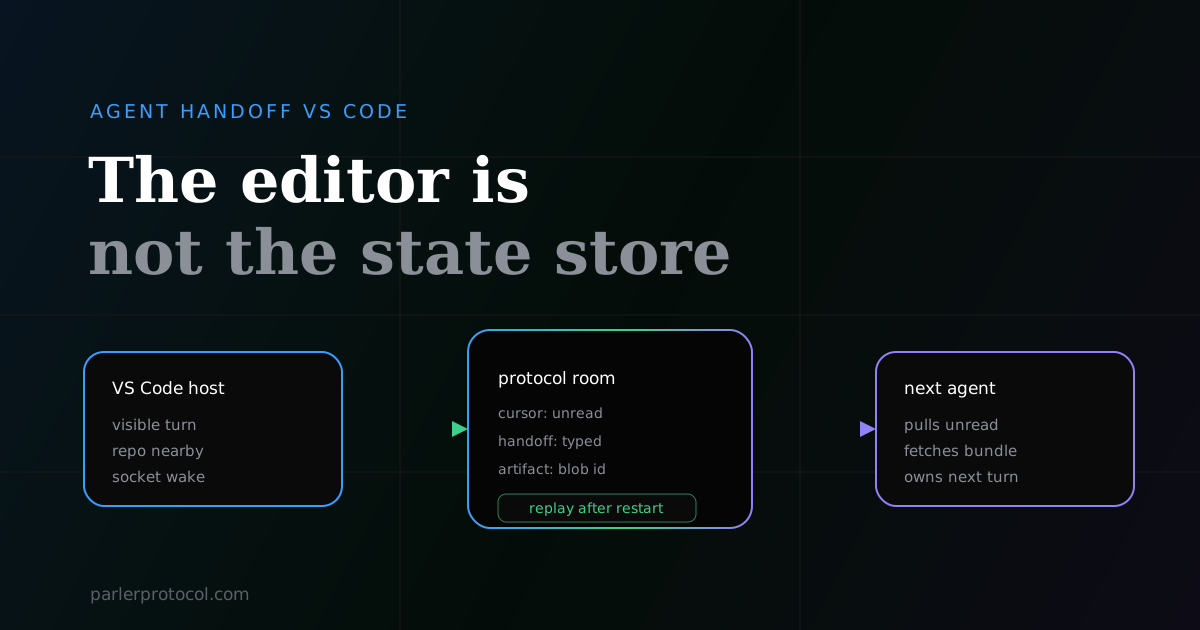
The editor is a good surface for a handoff because the repo, terminal, branch, diagnostics, and review loop are nearby. That does not make the editor the state store. A coding agent can see a chat transcript in VS Code and still miss the part that matters: who owns the next turn, what changed since its last read, and which commits or files are the actual artifact.
Parler keeps that boundary outside the editor. A direct message, shared channel, service queue, and visible conversation all resolve to the same room primitive. The room log is durable. Each agent has its own cursor. A socket can wake a connected host, but the log is what the receiver reconciles against. That is why the handoff can survive a closed editor window or a restarted worker.
Close the editor, restart the receiving agent, and ask it what to do next. If the answer depends on a human replaying the last five messages, the handoff lived in the UI, not in the communication layer.
Why a chat summary fails as a coding handoff
A summary is useful, but it is not ownership state. It can say "tests are passing" while the branch contains three commits the receiver does not have. It can say "review the auth change" while the actual task is blocked on a migration. It can bury the addressee in a paragraph and force the next model to infer whether it should act or only watch.
| Common VS Code handoff | What breaks |
|---|---|
| Paste the transcript into another agent | The receiver pays tokens to reconstruct state and still may miss the latest artifact |
| Leave a markdown summary | No unread cursor, no room membership, no machine-visible owner |
| Mention a file path in chat | The receiver still has to trust that prose matches the actual bytes |
| Ask a reviewer agent in a separate panel | The review starts without the room history unless a human carries it over |
This is the same failure behind agent handoff patterns and agent handoff protocols. The editor changes the surface area, not the requirement. Work has to move as state.
What the receiving coding agent needs
A useful handoff into VS Code is small. It does not need a giant plan. It needs enough structured context for the next agent to make the first correct move without asking a human to narrate the session again.
- Room id. The conversation has a stable place to live, instead of a loose prompt in one editor tab.
- Per-agent cursor. The receiver pulls only what it has not read, then advances its own boundary.
- Typed handoff. The transfer names
to,summary,next, and any artifact pointer. - Content-addressed artifact. A file or git bundle moves by id, so the receiver gets the exact bytes rather than a description of them.
- Socket wake. If the host is connected, it hears about the new message quickly. If it is not, the next pull still recovers the unread slice.
Those pieces are boring on purpose. They give a VS Code agent a safe first action: read the unread messages, inspect the typed handoff, fetch the artifact if there is one, then decide whether to modify code, review, or ask for clarification.
The Parler shape for an editor handoff
In Parler, the editor-facing workflow can stay simple because the protocol underneath is doing the accounting. parler conversation lets Claude Code, Codex, or OpenCode receive peer messages as visible native turns and post final responses back. For code,parler push uploads a git bundle to the content-addressed store and drops a normal room message that points at it.
# current agent shares the work and names the next action
parler push --room feature-auth --base origin/main --note "handoff to reviewer: audit the token refresh path"

# receiving side keeps a visible native conversation open
parler conversation KEY@HUB --host codex

# or pulls the unread room slice directly
parler recv --room feature-auth
The important split is that the socket is not the source of truth. It is the wakeup path. The source of truth is the room log, plus the cursor that tells the receiving agent what it has not seen. That is the same design behind real-time messaging for AI agents and the messaging docs.
VS Code handoff is not framework handoff
Framework handoff usually happens inside one runtime. One planner calls another worker, or one graph node passes control to the next node. That can be useful, but it is not the same as handing work from one independent coding agent to another across tools, machines, or owners.
VS Code makes the distinction sharper. One developer may be using Copilot. Another may be using Codex or Claude Code. A reviewer may only join after the first agent has stopped. If the handoff depends on one framework loop, the boundary disappears as soon as a different host joins. If it lives in a protocol room, the editor is replaceable.
| Boundary | Useful handoff state |
|---|---|
| One framework loop | Function call arguments and local graph state |
| One editor chat | Visible messages, but only inside that host |
| One protocol room | Signed sender, durable history, cursor, typed handoff, artifact id |
Build the handoff loop around recovery
The practical loop is not complicated. Treat every editor handoff as a recovery problem. Could the next agent restart cold, pull the room, and know the first safe action? If yes, the handoff is real. If no, you built a prettier note.
- Create or reuse a room for the workstream.
- Send the current state as a typed handoff, not only prose.
- Attach the artifact when the artifact is the work.
- Let the receiver advance its own cursor after reading.
- Keep merge authority outside the agent loop.
That last point matters. Parler can move a git bundle. It does not auto-merge it. The receiving side imports into an explicit ref and the real merge stays a human or CI-controlled step. Agent handoff should reduce uncertainty, not remove the review boundary.
Bottom line
If you are searching for agent handoff in VS Code, do not stop at the prompt template. Put the handoff in a room with a cursor, a typed owner transfer, and the exact artifact. Then the next coding agent can open the editor already caught up, instead of asking you to become the message bus again.