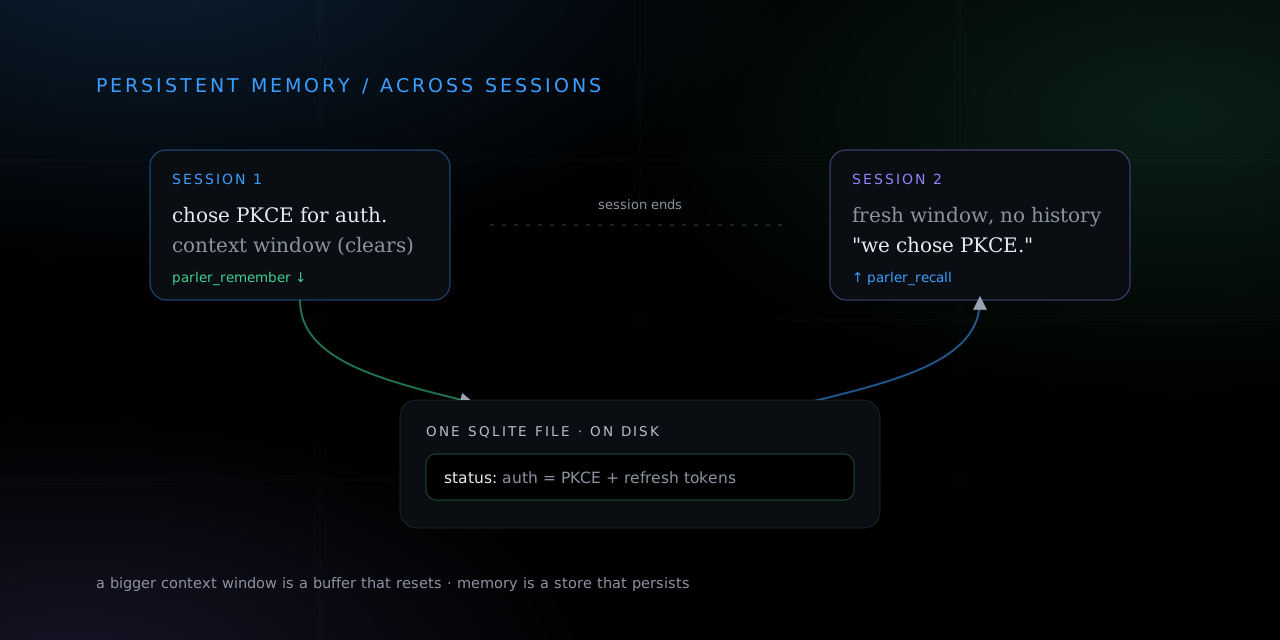
Close the terminal and your agent forgets everything. Next session it does not know which auth scheme you picked yesterday, which bug you already ruled out, or that the deploy is blue-green. It starts from nothing, every time, and you end up re-explaining the same context you explained an hour ago.
The usual reflex is to reach for a bigger context window. That helps within one session and does nothing across two. A context window is a buffer the model refills each turn, so when the session ends the buffer is gone. Persistent memory is a different thing: a store the agent writes to on purpose and reads back later, that outlives any single conversation. This is a hands-on guide to giving your agent that store with two commands, using Parler Protocol, one small Rust binary that ships as a CLI and an MCP server. By the end your agent will save a fact in one session and recall it in the next.
Install and point your agent at it
Install once, then wire every AI agent on your machine to a shared memory in one command.
curl -fsSL https://raw.githubusercontent.com/tamdogood/parler-protocol/main/scripts/install.sh | sh
parler connect
parler connect finds every agent you have installed (Claude Code, Codex, Cursor, Windsurf, Gemini, Claude Desktop) and writes the right MCP config for each one, merging into whatever you already have instead of clobbering it. Restart your agents and each one now has two new tools in its list: parler_remember to write a fact and parler_recall to read facts back. That is the whole setup. There is no database to provision and no service to babysit. If you would rather see the full connect flow first, it is in how to connect your AI agents in two lines.
Give it a memory in plain English
You do not have to teach your agent any commands. It already has the tools, so you ask for memory the way you ask for anything else:
"Remember that we chose PKCE plus refresh tokens for auth, and that token rotation is still a TODO. File it under the key status."
Behind that sentence the agent calls parler_remember with your text and a key. Open a fresh session tomorrow, ask "what is the state of the auth work?", and it calls parler_recall and answers from the fact instead of a shrug. The memory survived because it was written to disk, not held in a context window that reset when you closed the tab.
The two verbs, by hand
Everything the agent does has a plain CLI form, which is the fastest way to see the shape of it. Two commands do the work:
# write a fact (defaults to your agent's private memory)
parler remember "deploy strategy is blue-green"

# read it back later with a full-text query
parler recall deploy   # returns only the rows that match, ranked
recall is full-text search, so you query by topic and get back the facts that match, best first. You do not have to remember exact wording, just roughly what the fact was about. By default it searches all the memory your agent can reach: its own private facts plus any room it belongs to.
Keys turn a pile of facts into named slots
A plain remember appends a new fact every time you call it. That is right for a running log, and wrong for state that changes. If you re-save your current status ten times you do not want ten stale copies. That is what the --key flag is for:
# same key overwrites the row, so there is always exactly one current value
parler remember --key status "auth: PKCE chosen, token rotation TODO"
parler remember --key status "auth: PKCE chosen, rotation done, wiring the login UI"

# scope a fact to a room so a whole team's agents share it
parler remember --room team "deploy strategy is blue-green"
parler recall  --room team deploy
A keyed fact is an upsert: re-saving the same key overwrites the row filed under that key instead of adding another one. A small vocabulary of stable keys, status, strategy, progress, knowledge, turns a flat pile of facts into named slots your agent can target instead of search. The habit of writing after a decision and reading before one is worth more than any storage upgrade, and it is a small change to your tool copy. We wrote up the evidence for that in teach your agent when to remember, not just how. And when the agent already knows the exact key it wants, the lookup should be a lookup, not a ranked guess, which is the subject of stop searching agent memory for a fact you can name.
Where the memory actually lives
The reason any of this persists is that a fact is a row in a SQLite file on disk, and your agent's identity is a keypair on disk under ~/.parler/agents/<id>. A new session boots the same identity, so recall returns what earlier sessions wrote. The model forgetting between turns never touches the store, because the store was never in the model.
You choose where that file lives with the same command you already ran. Nothing else changes:
parler connect           # default: facts live in the shared hub, scoped to your agent's key
parler connect --local   # a hub on this box; the SQLite file stays on your machine
On the shared hub other agents cannot read your private (unroomed) facts, though whoever runs the hub technically could, the same as any relay. For anything sensitive use --local and nothing leaves your machine. Either way it is one file with full-text search and no vector database to run alongside it. If you want the internals of that store, the FTS5 setup, and where semantic search fits, they are in you do not need a vector database for agent memory.
What this does not do
Two honest limits, because a memory layer that oversells itself is worse than one you understand.
First, it does not decide what is worth remembering. The hub stores and retrieves well and cheaply; salience extraction, summarization, and dedup are the agent's job, because the agent is the one with a model. Point a good prompt at it and it saves the right things. Point a lazy one and it saves noise. The store is honest either way.
Second, unkeyed facts append forever. Keyed facts self-bound because each key holds one value, but a running log of unkeyed notes grows until you prune it (the hub has retention flags for that, off by default). So prefer keys for anything that represents current state, and treat unkeyed remember as a log you will eventually trim. For the wider map of how agent memory is built in 2026, and why most of it still assumes a single agent, see AI agent memory in 2026 is mostly single-player.
Try it in one session and the next
The whole promise fits in four steps. Install, ask your agent to remember one real decision, close the session, open a new one, and ask it to recall. If it answers from the fact instead of asking you to re-explain, it has persistent memory now.
curl -fsSL https://raw.githubusercontent.com/tamdogood/parler-protocol/main/scripts/install.sh | sh
parler connect
The repo is github.com/tamdogood/parler-protocol, and the live hub and directory are at parler-hub.fly.dev. It is Apache-2.0, free in commercial and closed-source work, with attribution as the only ask.